Claude Code usage limit reached: what it means and what to do
How the session and weekly limits work, how to check when they reset, what quietly eats your usage, how to find it with /usage and /context, and what to do when you are blocked.
You are in the middle of a task and Claude Code stops: you've hit your session limit. Sometimes it is fair — a long day of work. Often it comes surprisingly early, and the real cause is something that quietly burns usage on every turn. Here is what the message means, how to see when the limit resets, what typically eats it, and what to do right now and next time.
1. What “usage limit reached” means in Claude Code
On a Claude subscription (Pro, Max, Team and others) there are two main limits:
- The session limit — usage counted over a rolling five-hour window. Hit it, and you wait until the window resets.
- The weekly limit on top of that. Hit this one, and the wait can be days.
Both are shared across all models, so switching with
/model does not get you past them. The exception is a model-specific
message such as “you've hit your Opus limit”: then a model from another family does keep
you working. Plan usage is also shared with Claude on the web and in the apps — a long
chat in the morning leaves less for coding in the afternoon. Anthropic publishes the
limits only as multiples between plans, not as token counts; see
Claude Pro vs Max for the plans
themselves.
On an API key none of this applies: there is no window to wait for, you pay for every token.
2. Check your usage and when the limit resets
/usage— on a subscription, bars for your plan limits with their reset times, plus activity stats and a breakdown of what used them (more below). For API-key sessions it shows the session's cost./costis just another name for it.- Settings → Usage on claude.ai — the same limits, outside the terminal.
/status— the version, model and account this session uses. If you hit a limit while you think you are on an API key, or get a bill while you think you are on a subscription, look here first. AnANTHROPIC_API_KEYin your shell wins over your subscription once you approve it — and in scripts withclaude -pit is used without asking.
Look at /usage early in the day, not when you are already blocked: at 70 %
of the window by ten in the morning, you know the afternoon will need a different plan.
3. What eats your Claude Code limit
The key fact: every request sends the whole conversation again — and every round of tool calls is another request. Prompt caching makes re-reading that history cheaper, but not free, so a one-line question at the end of a session that has been open all day still draws usage for the whole conversation. From there, the usual suspects:
- Long sessions without
/clear. Unrelated tasks pile up in one conversation and every later request carries them along. - Breaks. Your first message after the cache has expired re-processes the whole context at full price. After a lunch break, a long session is expensive to pick up again.
- Huge tool output. A full test log, a minified file, a
git diffof a lock file — read once, then carried in every following request. - A long CLAUDE.md, loaded into every session whether the task needs it or not.
- The largest model and the highest effort for everything, including renames and small edits. Thinking is billed as output.
- Parallel work. Every subagent, workflow agent and agent teammate sends its own requests on top of yours.
- Work while you are away. Scheduled tasks such as
/loopfire even when the session sits idle, each time with the full context. - Loops. An agent fixing a test it cannot fix, or a Stop hook that keeps sending it back — each round is another full request.
MCP servers are less of a problem than they used to be: tool definitions are now
loaded only when Claude uses a tool, so an unused server costs little more than its
name. CLI tools like gh are still lighter than their MCP equivalents.
4. Find out where your usage goes
Start with /usage itself. On a subscription it shows a
breakdown of the last 24 hours or 7 days (switch with d
and w):
- the share of usage attributed to skills, subagents, plugins and individual MCP servers;
- recommendations, one per row, for anything behind at least 10 % of your usage — for example trimming a specific CLAUDE.md or lowering the effort;
- the heaviest scheduled tasks that ran recently.
Press f and Claude Code applies the recommendations it can, showing you each
change first. The breakdown is computed from session history on this machine, so usage
from other computers and from claude.ai is not in it.
/context shows what fills the current session's context as a grid, with
suggestions for heavy tools and oversized memory files. For a longer history across
sessions and projects, the community tool ccusage reads Claude Code's
local logs and sums tokens per day, session or five-hour block:
npx ccusage@latest daily
npx ccusage@latest blocks
Its dollar figures are what the tokens would cost on the API — on a subscription you do not pay them, but they are a good yardstick for which days were heavy.
5. Hit the limit: what to do right now
- Run
/rate-limit-options. It lists your ways forward in one place: wait, add usage credits, or upgrade. - Wait and let it continue on its own. Recent versions of Claude Code can wait for the reset and then continue the interrupted task automatically. If the window resets in an hour, use the time to review what the agent has done so far — it is often the most useful hour of the day.
- Turn on usage credits with
/usage-credits: you keep working and pay for the extra at API rates, up to a monthly spend limit you set. Fine for an occasional deadline, expensive as a habit. - Switch models only for a model-specific limit. “You've hit your
Opus limit” — switch to another family with
/model. For the session or weekly limit it does not help. - Hand the task to another agent. Codex or another CLI has its own limits; our comparison shows what each does well, and CC Switch makes switching less painful.
- Upgrade the plan only if you hit the limit regularly — once a month is cheaper with credits.
Whichever way you continue, consider /clear with a short summary of the
task instead of dragging a bloated conversation along. Note that /compact
is itself a large request, because it reads everything it summarizes;
/clear costs nothing.
6. Make your limit last: a checklist
/clearbetween unrelated tasks —/renamefirst if you want to/resumethe session later.- Do not leave a huge session idle over lunch; start fresh after a long break.
- Trim noisy output: run tests with a quiet reporter, or let a hook pass on only the last lines.
- Keep CLAUDE.md short; move workflow-specific instructions into skills, which load only when used.
- Match the model and effort to the job:
/modeland/effort. - Plan first: a rejected plan costs a fraction of a rejected implementation.
- Stop loops early: if the agent is on its third attempt at the same failing test, step in — Esc stops it immediately.
- Check scheduled tasks and teammates you no longer need.
- Run
/usageonce a week and look at the recommendations.
7. Watch your limits from your phone
The worst way to find out about a limit is coming back to the computer after an hour and seeing that the agent stopped five minutes after you left. In coden, the Agent runs on your computer and the app has a Usage screen in the project:
- the 5-hour window and the weekly limit of your subscription, with a countdown to the reset — as Claude Code reports them with every turn;
- tokens and cost per day for the last two weeks and per hour for the last 24 hours — on a subscription priced at API rates as a yardstick, and the screen says so;
- the most expensive Conversations and models of the last 30 days, so you see which work used the most.
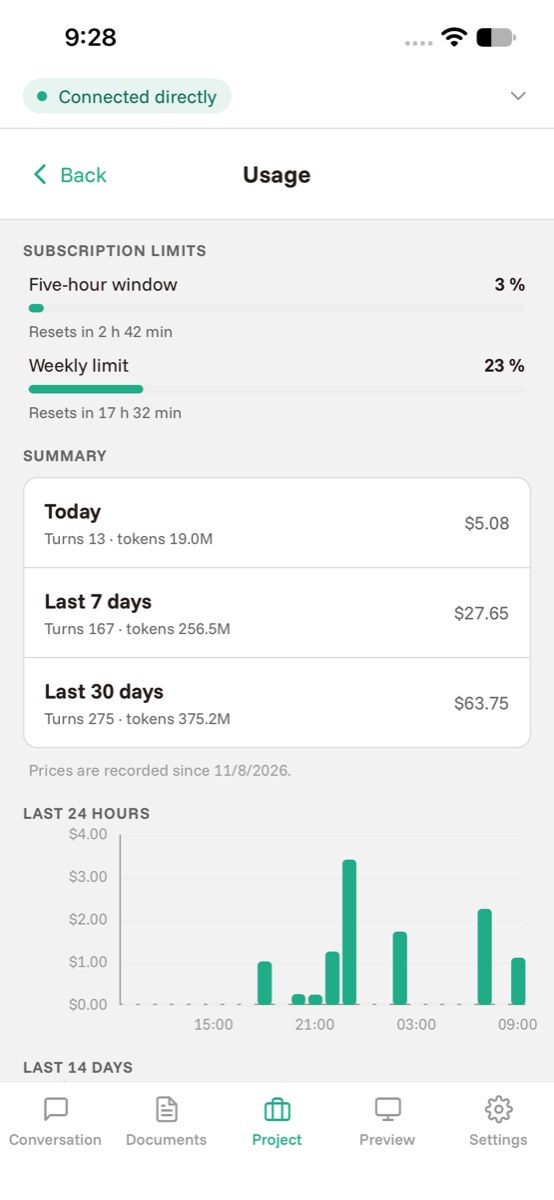
When a limit runs out, it shows up as a note right in the Conversation instead of as a silent stop. coden works with a Claude subscription or an API key, and with Codex, where it shows the limits of your ChatGPT account.
Do you see it differently? Write to support@coden-app.com.